




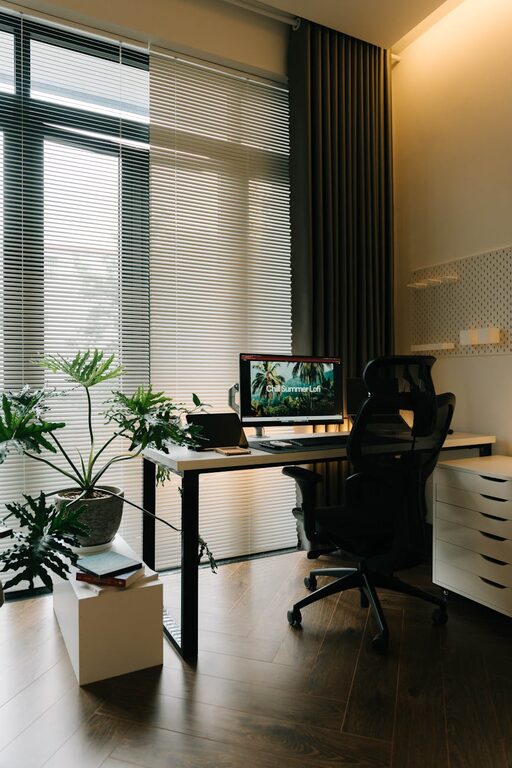
Creating a relaxing home office space is essential for staying productive and motivated while working from home. Your environment plays a significant role in how well you focus and perform daily tasks. By designing a workspace that promotes calmness and comfort, you can make work feel less stressful and more enjoyable.
In this post, we’ll explore practical tips to help you create a home office that combines relaxation and productivity.
Why a Relaxing Home Office Matters
When you work from home, it’s easy for distractions and stress to reduce your efficiency. A cluttered or uncomfortable space can make it difficult to concentrate, leading to fatigue and frustration. On the other hand, a thoughtfully designed office encourages focus, creativity, and a positive mindset.
A relaxing office space helps:
– Reduce stress and anxiety
– Improve concentration and workflow
– Boost energy and motivation
– Create a clearer boundary between work and personal life
Choosing the Right Location
The first step in creating a relaxing home office is picking the best spot.
Consider Natural Light
Natural light has proven benefits for mood and productivity. Wherever possible, set up your desk near a window to enjoy daylight. This will help regulate your body’s natural rhythms and reduce eye strain.
Minimize Noise
If noise is a distraction, try to select a quiet room or corner with minimal foot traffic. You may also use noise-cancelling headphones or soft background music to maintain focus.
Separate Work and Leisure
Designating a specific area for work helps your brain associate that space with productivity, making it easier to switch into work mode. Avoid working from beds or couches when possible.
Ergonomic Furniture and Comfort
Comfort is key for a relaxing and productive office. Invest in ergonomic furniture that supports good posture.
Desk and Chair
Choose a desk of the right height so your elbows rest comfortably at a 90-degree angle when typing. An adjustable chair with good lumbar support helps prevent back pain during long hours.
Monitor Position
Place your monitor at eye level about an arm’s length away. This setup prevents neck strain and encourages better posture.
Additional Comfort Items
Consider adding a footrest, wrist supports, or an anti-fatigue mat if you spend time standing. These small additions can increase comfort throughout your workday.
Declutter and Organize
A clean workspace promotes a clear mind.
Keep Only Essentials
Limit what you keep on your desk to items you use daily. Store papers and supplies in drawers or organizers.
Use Storage Solutions
Shelves, filing cabinets, and baskets can keep your office tidy and organized. Label containers for easy access.
Daily Clean-up Routine
Spend 5 minutes at the end of each day clearing your desk. This habit resets your space and prepares you for the next day’s work.
Incorporate Calming Elements
Adding relaxing touches to your workspace can improve your mood and reduce stress.
Plants and Greenery
Houseplants purify the air and add life to your office. Easy-care plants like succulents or spider plants are great options.
Personal Touches
Display photos, artwork, or inspirational quotes that make you feel positive.
Soft Lighting
Avoid harsh overhead lights. Use desk lamps or floor lamps with soft, warm bulbs to create a cozy atmosphere.
Aromatherapy
If you enjoy scents, consider a diffuser with calming essential oils like lavender or eucalyptus. Use these subtly to avoid overwhelming your space.
Set Boundaries and Routine
Creating a work routine and clear boundaries helps maintain work-life balance.
Define Work Hours
Set specific times for starting and ending your workday. Stick to breaks and lunchtime to recharge.
Use Visual Cues
If your office is in a shared space, a door sign or signal can indicate when you are working and should not be disturbed.
Take Breaks
Regular breaks prevent burnout. Step away from your desk, stretch, or take a short walk to refresh your mind.
Technology and Connectivity
A smoothly running setup reduces frustration.
Reliable Internet
Ensure your internet connection is strong and stable to avoid interruptions.
Cable Management
Organize cords and chargers to prevent tangles and keep your desk neat.
Essential Tech Tools
Use headphones, an external keyboard, or a mouse to improve comfort and efficiency.
Final Thoughts
Designing a relaxing home office is about creating a space that supports your well-being and productivity. By choosing the right location, investing in comfort, keeping organized, adding calming touches, and establishing good routines, you’ll set yourself up for successful workdays.
Remember, your workspace should reflect your personal style and needs. Take your time to create an environment where you feel focused and relaxed—both key ingredients for productive work.